Support & Community > Plans and billing
Bring your own API key
# Bring your own API key Warp supports **Bring your own API key (BYOK)** for users who want to connect Warp's agents to their own Anthropic, OpenAI, or Google API accounts. BYOK gives you full control over model selection, billing, and data routing. See [Model Choice](/agent-platform/capabilities/model-choice/) for the full list of supported models. When you route a request through your own key, Warp **never consumes your** [credits](/support-and-community/plans-and-billing/credits/) for that request. :::note On the Business and Enterprise plans, local agent runs that use BYOK still consume platform credits for Warp's platform infrastructure (run lifecycle, integrations, observability). See [platform credits](/support-and-community/plans-and-billing/platform-credits/) for what's covered. ::: :::note BYOK is available on the Free plan and on all eligible paid plans. See [warp.dev/pricing](https://www.warp.dev/pricing) for the current list of eligible plans. ::: :::note BYOK and custom inference endpoint support are available for individual users and organizations with 10 or fewer employees, subject to Warp's [Terms of Service](https://www.warp.dev/terms-of-service). Companies or organizations with more than 10 employees require a Warp Business or Enterprise plan to use BYOK or customer-supplied inference. ::: ## How BYOK differs from Custom inference endpoint and BYOLLM Warp offers three ways to bring your own AI infrastructure. Use this table to pick the right one, and follow the links for full details. | Name | Meaning | Plans | | --- | --- | --- | | **Bring your own API key** (BYOK) | Use your own API key for OpenAI, Anthropic, or Google models. Keys are stored locally on your device. | Free and all eligible paid plans | | **[Custom inference endpoint](/support-and-community/plans-and-billing/custom-inference-endpoint/)** (CIE) | Connect Warp to an OpenAI-compatible endpoint such as OpenRouter, LiteLLM, z.ai, or an internal gateway. | Free and all eligible paid plans | | **[Bring your own LLM](/enterprise/enterprise-features/bring-your-own-llm/)** (BYOLLM) | Enterprise-managed inference through your cloud provider (AWS Bedrock, Azure Foundry, Google Vertex) or approved internal infrastructure, with Warp handling routing, orchestration, governance, and observability. | Enterprise only | See [warp.dev/pricing](https://www.warp.dev/pricing) for current plan availability. Platform credits may apply for local agent runs on Business and Enterprise when using BYOK, CIE, or BYOLLM. See [platform credits](/support-and-community/plans-and-billing/platform-credits/). ## How BYOK works When you add your own model API keys in Warp, those keys are stored **locally on your device** and are **never synced to the cloud**. Warp uses these API keys to route your agent requests directly to the model provider you've configured. :::caution BYOK does not apply to [Cloud Agents](/agent-platform/cloud-agents/overview/). Because your API keys are stored locally on your device, they are not available to cloud-hosted agent runs. Cloud agent runs always consume [Warp credits](/support-and-community/plans-and-billing/credits/). ::: When a model is selected using your own key: * Warp **does not consume** any of your [credits](/support-and-community/plans-and-billing/credits/). * Costs are billed directly through your model provider account. * Warp does not retain or store your API key on any of its servers.  ## Enabling BYOK To enable and configure your API keys: 1. Open **Settings** and search for `API keys` to jump to the BYOK configuration. 2. Add your API key(s) for Anthropic, OpenAI, or Google. 3. Once added, you'll see a **key icon** next to supported models in the model picker. :::note The BYOK configuration widget doesn't currently live on a dedicated sidebar subpage; searching from the **Settings** window is the quickest way to reach it. We're tracking a follow-up to surface it under a persistent sidebar entry. :::  When you explicitly select a model with a key icon, Warp routes requests through your own API key instead of consuming Warp's credits. ## BYOK usage and billing behavior ### Auto Model Warp's **Auto** models dynamically route requests across different models based on context and performance. Because this routing logic depends on Warp's infrastructure, **Auto always consumes Warp's credits**, even if you've configured your own API keys. To use your own key, select a specific provider model (for example, Claude Opus 4.7, Claude Sonnet 4.6, GPT-5.5, or Gemini 3.1 Pro) directly from the model picker with a key icon. ### Credit usage When you select a model with the key icon in your model picker, Warp routes the request through your API key. In this case: * No Warp credits are consumed. * The cost of the request is billed directly through your provider account. * Core Agent Mode always **prioritizes BYOK usage** over any available credits. The credit transparency footer will show “0 credits used”, and the `Billing & Usage` page will reflect no deductions from your monthly credit total. **Other AI features in Warp** Some AI-powered features are not affected by BYOK and are included as part of Warp’s paid plans. | Feature | Uses Warp's credits | Description | | ----------------------------------------------------------------------------- | ------------------- | -------------------------------------------------------------------- | | [Active AI Recommendations](/agent-platform/local-agents/active-ai/) | No | Always included with Build and higher plans. | | [Codebase Context](/agent-platform/capabilities/codebase-context/) | Yes | Uses Warp's AI infrastructure and consumes credits. | | [Cloud Agents](/agent-platform/cloud-agents/overview/) | Yes | BYOK keys are stored locally and not available to cloud-hosted runs. | These features will continue to function normally regardless of whether you’ve configured BYOK. ### Failover and fallback behavior If Warp detects an issue with your API key, you’ll see a clear error message corresponding with the AI request. If your key: * Is invalid: Warp notifies you and halts the request. * Hits usage or rate limits: Warp will not retry using credits. * You can update or replace your keys anytime by opening **Settings** and searching for `API keys`. **Failover and fallback:** By default, Warp does not fall back to your credits when a BYOK request fails. You can choose to enable **Warp credit fallback**. When enabled, if an agent request fails with your BYOK model (for example, due to an API error or quota limit), Warp will automatically route the request to one of Warp’s provided models. Warp always prioritizes your API keys first and only uses Warp credits when necessary.  ### Zero Data Retention (ZDR) and BYOK Warp is **SOC 2 compliant** and has **Zero Data Retention (ZDR)** policies with all of its contracted LLM providers. No customer AI data is retained, stored, or used for training by the model providers. However, when you use your own API key: * Data retention policies depend on your provider’s account settings. * Warp cannot enforce ZDR for requests sent through your API keys. * If your Anthropic, OpenAI, or Google account does not have ZDR enabled, your requests may be retained by the provider according to their terms. Warp itself never stores your LLM API keys. ### BYOK on Enterprise and Business plans BYOK is available to individual users and to organizations with 10 or fewer employees, subject to Warp's [Terms of Service](https://www.warp.dev/terms-of-service). Companies or organizations with more than 10 employees need a Warp Business or Enterprise plan to use BYOK or customer-supplied inference. Today, BYOK is configured at the **user level** on every plan, including Enterprise and Business: * Each team member can add and manage their own API keys locally on their device. * Centrally configured, admin-managed BYOK is not yet available — admins cannot enforce or share API keys across team members from a single place. * There is no organization-level Admin Panel for BYOK management today. If your organization needs centrally managed model routing now, see [Bring your own LLM](/enterprise/enterprise-features/bring-your-own-llm/) for the Enterprise-managed option. To discuss a fit, contact us at [warp.dev/contact-sales](https://www.warp.dev/contact-sales). ## Related resources * [Custom inference endpoint](/support-and-community/plans-and-billing/custom-inference-endpoint/) — Route Warp through any OpenAI-compatible endpoint, such as OpenRouter, LiteLLM, z.ai, or an internal gateway. * [Bring your own LLM](/enterprise/enterprise-features/bring-your-own-llm/) — Enterprise-managed inference through your cloud provider or approved infrastructure. * [Model Choice](/agent-platform/capabilities/model-choice/) — Full list of supported models and `model_id` values. * [Credits](/support-and-community/plans-and-billing/credits/) — How Warp credits work and when they're consumed.Use your own OpenAI, Anthropic, or Google API keys. Never consumes AI credits — on Business and Enterprise, platform credits may apply for local agent runs.
Warp supports Bring your own API key (BYOK) for users who want to connect Warp’s agents to their own Anthropic, OpenAI, or Google API accounts.
BYOK gives you full control over model selection, billing, and data routing. See Model Choice for the full list of supported models. When you route a request through your own key, Warp never consumes your credits for that request.
How BYOK differs from Custom inference endpoint and BYOLLM
Section titled “How BYOK differs from Custom inference endpoint and BYOLLM”Warp offers three ways to bring your own AI infrastructure. Use this table to pick the right one, and follow the links for full details.
| Name | Meaning | Plans |
|---|---|---|
| Bring your own API key (BYOK) | Use your own API key for OpenAI, Anthropic, or Google models. Keys are stored locally on your device. | Free and all eligible paid plans |
| Custom inference endpoint (CIE) | Connect Warp to an OpenAI-compatible endpoint such as OpenRouter, LiteLLM, z.ai, or an internal gateway. | Free and all eligible paid plans |
| Bring your own LLM (BYOLLM) | Enterprise-managed inference through your cloud provider (AWS Bedrock, Azure Foundry, Google Vertex) or approved internal infrastructure, with Warp handling routing, orchestration, governance, and observability. | Enterprise only |
See warp.dev/pricing for current plan availability.
Platform credits may apply for local agent runs on Business and Enterprise when using BYOK, CIE, or BYOLLM. See platform credits.
How BYOK works
Section titled “How BYOK works”When you add your own model API keys in Warp, those keys are stored locally on your device and are never synced to the cloud.
Warp uses these API keys to route your agent requests directly to the model provider you’ve configured.
When a model is selected using your own key:
- Warp does not consume any of your credits.
- Costs are billed directly through your model provider account.
- Warp does not retain or store your API key on any of its servers.
Enabling BYOK
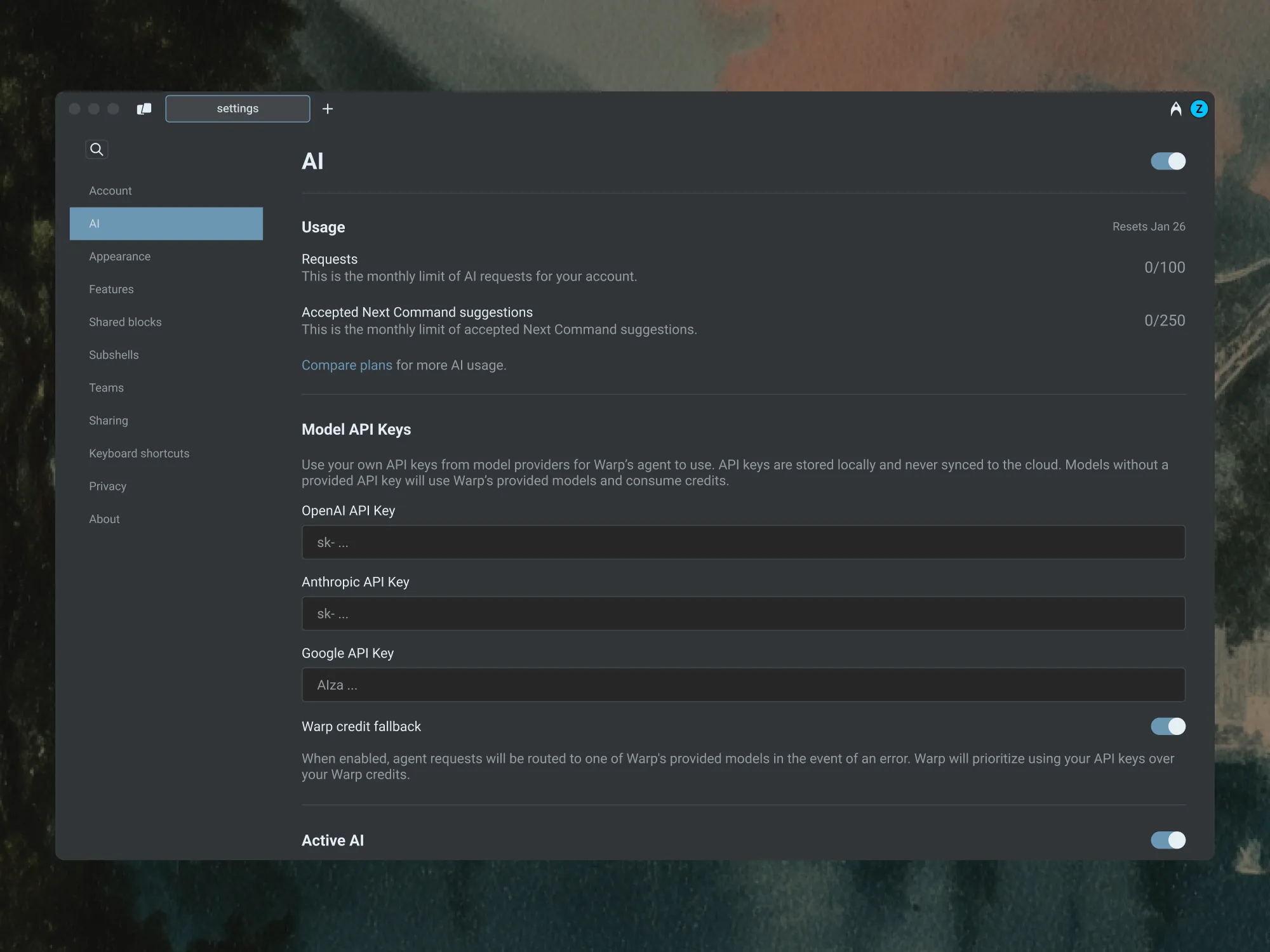
Section titled “Enabling BYOK”To enable and configure your API keys:
- Open Settings and search for
API keysto jump to the BYOK configuration. - Add your API key(s) for Anthropic, OpenAI, or Google.
- Once added, you’ll see a key icon next to supported models in the model picker.
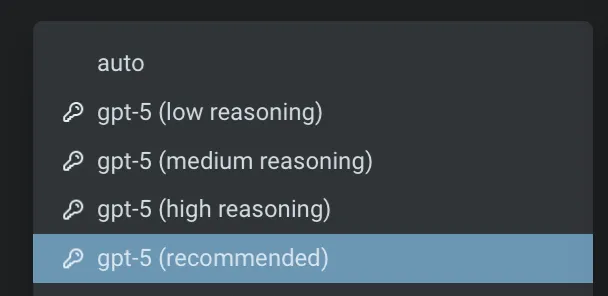
When you explicitly select a model with a key icon, Warp routes requests through your own API key instead of consuming Warp’s credits.
BYOK usage and billing behavior
Section titled “BYOK usage and billing behavior”Auto Model
Section titled “Auto Model”Warp’s Auto models dynamically route requests across different models based on context and performance. Because this routing logic depends on Warp’s infrastructure, Auto always consumes Warp’s credits, even if you’ve configured your own API keys.
To use your own key, select a specific provider model (for example, Claude Opus 4.7, Claude Sonnet 4.6, GPT-5.5, or Gemini 3.1 Pro) directly from the model picker with a key icon.
Credit usage
Section titled “Credit usage”When you select a model with the key icon in your model picker, Warp routes the request through your API key.
In this case:
- No Warp credits are consumed.
- The cost of the request is billed directly through your provider account.
- Core Agent Mode always prioritizes BYOK usage over any available credits.
The credit transparency footer will show “0 credits used”, and the Billing & Usage page will reflect no deductions from your monthly credit total.
Other AI features in Warp
Some AI-powered features are not affected by BYOK and are included as part of Warp’s paid plans.
| Feature | Uses Warp’s credits | Description |
|---|---|---|
| Active AI Recommendations | No | Always included with Build and higher plans. |
| Codebase Context | Yes | Uses Warp’s AI infrastructure and consumes credits. |
| Cloud Agents | Yes | BYOK keys are stored locally and not available to cloud-hosted runs. |
These features will continue to function normally regardless of whether you’ve configured BYOK.
Failover and fallback behavior
Section titled “Failover and fallback behavior”If Warp detects an issue with your API key, you’ll see a clear error message corresponding with the AI request.
If your key:
- Is invalid: Warp notifies you and halts the request.
- Hits usage or rate limits: Warp will not retry using credits.
- You can update or replace your keys anytime by opening Settings and searching for
API keys.
Failover and fallback:
By default, Warp does not fall back to your credits when a BYOK request fails.
You can choose to enable Warp credit fallback. When enabled, if an agent request fails with your BYOK model (for example, due to an API error or quota limit), Warp will automatically route the request to one of Warp’s provided models. Warp always prioritizes your API keys first and only uses Warp credits when necessary.

Zero Data Retention (ZDR) and BYOK
Section titled “Zero Data Retention (ZDR) and BYOK”Warp is SOC 2 compliant and has Zero Data Retention (ZDR) policies with all of its contracted LLM providers. No customer AI data is retained, stored, or used for training by the model providers.
However, when you use your own API key:
- Data retention policies depend on your provider’s account settings.
- Warp cannot enforce ZDR for requests sent through your API keys.
- If your Anthropic, OpenAI, or Google account does not have ZDR enabled, your requests may be retained by the provider according to their terms.
Warp itself never stores your LLM API keys.
BYOK on Enterprise and Business plans
Section titled “BYOK on Enterprise and Business plans”BYOK is available to individual users and to organizations with 10 or fewer employees, subject to Warp’s Terms of Service. Companies or organizations with more than 10 employees need a Warp Business or Enterprise plan to use BYOK or customer-supplied inference.
Today, BYOK is configured at the user level on every plan, including Enterprise and Business:
- Each team member can add and manage their own API keys locally on their device.
- Centrally configured, admin-managed BYOK is not yet available — admins cannot enforce or share API keys across team members from a single place.
- There is no organization-level Admin Panel for BYOK management today.
If your organization needs centrally managed model routing now, see Bring your own LLM for the Enterprise-managed option. To discuss a fit, contact us at warp.dev/contact-sales.
Related resources
Section titled “Related resources”- Custom inference endpoint — Route Warp through any OpenAI-compatible endpoint, such as OpenRouter, LiteLLM, z.ai, or an internal gateway.
- Bring your own LLM — Enterprise-managed inference through your cloud provider or approved infrastructure.
- Model Choice — Full list of supported models and
model_idvalues. - Credits — How Warp credits work and when they’re consumed.